In the dynamic world of web development, choosing the right Content Management System (CMS) is a foundational decision that impacts everything from your website’s performance to your team’s workflow and your future scalability. For years, traditional CMS platforms like WordPress or Drupal have been the standard. However, the rise of diverse digital channels and the demand for lightning-fast user experiences have brought headless CMS into the spotlight as a powerful alternative.
If you’re grappling with the choice between headless CMS vs traditional CMS, understanding their core differences, benefits, and limitations is crucial. This decision isn’t about one being inherently “better” than the other; it’s about finding the best fit for your specific project’s needs, budget, and long-term goals. Compare the benefits and limitations of headless and traditional CMS options. Click to find out which architectural approach aligns perfectly with your digital strategy!
Key Takeaways
Choosing between a Headless and a Traditional CMS is a fundamental architectural decision that determines your system’s flexibility, performance, and long-term viability.
- The Core Difference: Traditional CMS is Coupled (content management and presentation are one system). Headless CMS is Decoupled (content is stored and delivered via an API to any frontend). * The Trade-off: The choice is a balance between Simplicity & Speed (Traditional) and Flexibility & Performance (Headless).
- Traditional CMS (Coupled): Ideal for simple, single-channel websites, non-technical teams, and when quick launch and a large plugin/theme ecosystem are the priority. Lower initial cost and user-friendliness are key benefits.
- Headless CMS (Decoupled): Essential for multi-channel content delivery (web, app, IoT), projects demanding superior performance/speed, and teams requiring ultimate design freedom using modern frameworks (e.g., React, Vue).
- Cost & Skill: Headless has a higher initial setup cost and requires dedicated frontend developer expertise. Traditional CMS is manageable by marketers/content editors with minimal coding skills.
Understanding the Core Difference: Coupled vs. Decoupled
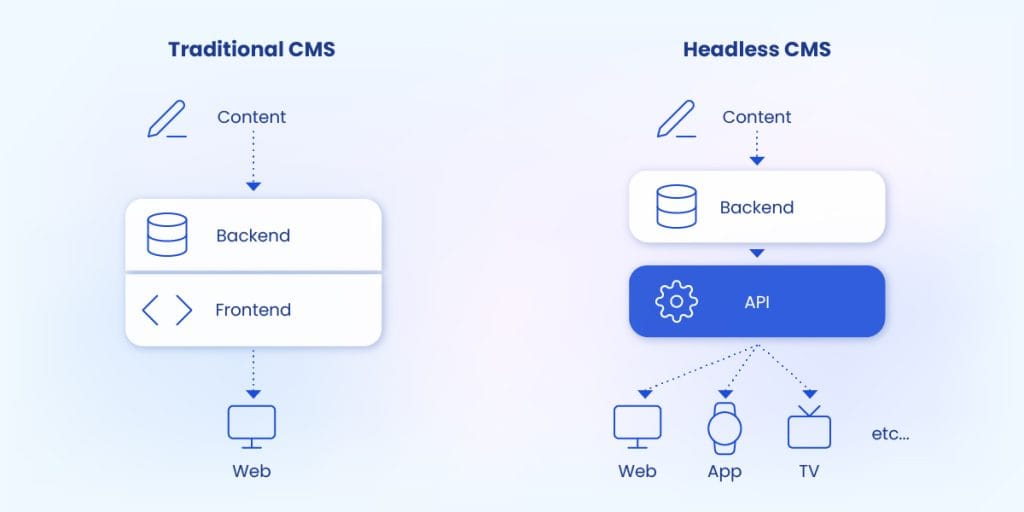
The fundamental distinction between traditional and headless CMS lies in their architecture – specifically, how they handle the “frontend” (what users see) and the “backend” (where content is managed).
- Traditional CMS (Coupled CMS):
- “Monolithic” or “Coupled”: In a traditional CMS, the content management interface (the backend, where you write and store content) and the content presentation layer (the frontend, which displays the content on a website) are tightly integrated into a single system.
- Think of it like: A pre-built house where the kitchen (content management) and living room (website display) are part of the same structure. Changes in one often affect the other.
- Examples: Classic WordPress, Drupal, Joomla, Magento (out-of-the-box).
- Headless CMS:
- “Decoupled”: A headless CMS separates the content management backend from the presentation layer. It focuses purely on storing and delivering raw content (text, images, data) via APIs (Application Programming Interfaces).
- Think of it like: A separate, highly organized kitchen that provides ingredients (content) on demand. You can then use these ingredients to cook various dishes (websites, mobile apps, smart displays) in completely different dining rooms (frontends).
- Examples: Contentful, Strapi, Sanity, Prismic.
This architectural difference drives all the unique advantages and disadvantages of each approach.
Traditional CMS: Pros and Cons
Traditional CMS platforms have been the backbone of the internet for decades, and for good reason.
Benefits of Traditional CMS:
- Ease of Use for Non-Developers:
- Visual Editing: Often features intuitive WYSIWYG (What You See Is What You Get) editors and drag-and-drop page builders.
- All-in-One Solution: Content management, themes, plugins, and hosting (in some cases) are bundled together, simplifying setup and management for beginners.
- Quick Launch: You can get a basic website up and running relatively quickly without extensive technical knowledge.
- Extensive Plugin & Theme Ecosystems:
- Ready-Made Functionality: Thousands of plugins and themes offer pre-built features (e-commerce, SEO, contact forms) that can be installed with a few clicks.
- Community Support: Large user communities provide abundant resources, tutorials, and support forums.
- Cost-Effective for Simple Websites:
- For basic informational sites, blogs, or small e-commerce stores, a traditional CMS can be very budget-friendly, especially with free core software (like WordPress) and affordable hosting.
- SEO-Friendly by Nature:
- Many traditional CMS platforms (especially WordPress with SEO plugins) are inherently structured to be easily crawlable by search engines and offer robust on-page SEO tools.
Limitations of Traditional CMS:
- Limited Frontend Flexibility:
- You’re often tied to the CMS’s templating system and programming language, which can restrict unique design or functionality requirements.
- Creating truly custom user experiences can be challenging or require extensive workarounds.
- Performance & Scalability Challenges (Potentially):
- The tight coupling can lead to slower loading times due to heavier codebases and server-side rendering for every page load.
- Scaling complex sites can be harder as the frontend and backend are interconnected.
- Security Vulnerabilities:
- Due to the integrated nature and common use of themes/plugins, traditional CMS platforms can be more susceptible to security vulnerabilities if not regularly updated and secured.
- Multi-Channel Delivery Difficulties:
- Delivering content seamlessly to mobile apps, smart devices, or IoT beyond a standard website often requires separate development efforts or complex integrations.
Also Read: Pros and Cons of Using an Open Source CMS
Headless CMS: Pros and Cons
Headless CMS platforms are gaining traction as businesses seek more control, flexibility, and performance.
Benefits of Headless CMS:
- Unmatched Frontend Flexibility:
- “Create Once, Publish Anywhere”: Content can be delivered to any digital platform (websites, mobile apps, smartwatches, voice assistants) using the best-fit frontend technology for each.
- Technology Agnostic: Developers can use modern frameworks (React, Vue, Angular) and programming languages they prefer, leading to innovative user experiences.
- Superior Performance & Scalability:
- Faster Loading Times: Frontends are often built to be lean and performant (e.g., static site generators), resulting in lightning-fast load times and better Core Web Vitals.
- Independent Scaling: Frontend and backend can be scaled independently, preventing one from bottlenecking the other.
- Enhanced Security:
- Reduced Attack Surface: The content management backend is not directly exposed to the public internet, making it less vulnerable to direct attacks.
- Separation of Concerns: Frontend and backend security can be managed separately, adding layers of protection.
- Developer Empowerment & Productivity:
- Best-of-Breed Approach: Teams can select the best tools for each part of the stack, fostering specialized expertise and efficiency.
- Parallel Development: Frontend and backend teams can work concurrently, accelerating development cycles.
- Future-Proofing:
- As new digital channels emerge, your content is already structured and accessible via API, making adaptation straightforward.
Limitations of Headless CMS:
- Requires Technical Expertise:
- Building a frontend from scratch and connecting it via APIs requires web development knowledge and skills. It’s not a “plug-and-play” solution for beginners.
- Higher Initial Setup Cost/Complexity:
- You’ll likely need separate hosting for the frontend, and the initial development effort can be more significant than a pre-packaged traditional CMS.
- Content editors might miss the “preview” functionality of a traditional CMS that shows content exactly as it will appear on the final site.
- No Built-in Frontend Tools:
- Features like themes, visual page builders, and certain plugins that come standard with a traditional CMS need to be custom-built or integrated separately.
- SEO Implementation Can Be More Complex:
- While highly SEO-friendly due to speed, SEO features (like meta tag management, sitemaps) need to be explicitly implemented on the frontend rather than being built-in to the CMS.
Headless CMS vs Traditional CMS: Which One Fits Your Needs?
The decision between a traditional and a headless CMS boils down to your specific project requirements, team capabilities, and strategic vision.
Conclusion: Make an Informed Choice for Your Digital Future
The debate of Headless CMS vs Traditional CMS isn’t about declaring a definitive winner, but rather understanding which solution best aligns with your unique digital strategy. If you prioritize ease of use, rapid deployment for a single website, and rely heavily on pre-built themes and plugins, a traditional CMS like WordPress remains an excellent choice.
However, if your vision includes delivering content across diverse digital channels, demanding cutting-edge performance, requiring ultimate design flexibility, or empowering a dedicated development team, then a headless CMS is undoubtedly the future-proof solution that will propel your business forward.
Navigating the complexities of CMS selection and implementation requires deep expertise. At RemoteForce, we specialize in comprehensive web and app development services, offering tailored solutions whether you choose a robust traditional CMS or the revolutionary flexibility of a headless architecture.
Our team helps you analyze your specific needs, select the ideal platform, and develop a high-performing, scalable, and secure digital presence that perfectly aligns with your business goals. Beyond web and app development, RemoteForce also offers digital marketing, graphic design, secretarial, legal, and accounting services, providing a holistic suite of solutions to empower your entire business.
Ready to build a powerful digital platform that truly fits your needs? Contact RemoteForce today to discuss whether a Headless CMS or Traditional CMS is the right fit for your next project!
Frequently Asked Questions (FAQ)
1. What does “API-first” truly mean for non-developers?
“API-first” means that the core function of the CMS is not building a website, but rather organizing content and making it available through a simple set of instructions (the API). For non-developers, this means your content is treated as flexible data that can be used not just for your website, but also for mobile apps, smart displays, chatbots, or even print catalogs—all powered by the same central content source.
2. What is “JAMstack,” and how does it relate to Headless CMS?
JAMstack stands for JavaScript, APIs, and Markup. It’s a modern web development architecture that uses a Headless CMS to deliver content via APIs, then uses JavaScript and static site generators (like Next.js or Gatsby) to build the frontend. The relationship is that Headless CMS is the content foundation that makes the high-speed, secure, and scalable JAMstack architecture possible.
3. Is it possible to make a Traditional CMS (like WordPress) Headless?
Yes, it is possible. This process is called decoupling. For WordPress, this involves disabling its built-in templating system and using the WordPress REST API or GraphQL to feed content to a custom frontend built with a modern framework (like React). This gives you the familiar WordPress backend while achieving the performance and flexibility of a Headless setup.
4. Which CMS type is generally cheaper for a small, basic informational website?
The Traditional CMS is almost always cheaper for a small, basic informational site.
- Traditional: Low upfront cost (free core software/cheap theme) and no need to hire an expensive frontend developer for the setup.
Headless: Requires significantly higher upfront cost and time investment to custom-build the frontend before the site can even display content.

- Outsourced vs In-House Digital Marketing in Singapore: What Actually Makes Sense for Your SME - July 10, 2026
- Building a Digital Marketing Strategy for Singapore Businesses: A Practical Roadmap for 2026 - July 10, 2026
- How Much Does Digital Marketing Cost in Singapore? (2026 Pricing Guide for SMEs) - July 10, 2026